
A Google Search Console export gives you rows, not decisions. A query at position 11 is not automatically a quick win, a low CTR is not automatically a bad title, and a ranking drop does not prove that somebody broke the page.
The useful job is smaller and more honest: turn the export into a short review queue, then verify every candidate against the ranking page, the live result and the business purpose of the site. The workflow below uses the free GSC Export Analyzer in your browser, without connecting an API or sharing Search Console access.
Export the Right Data From Google Search Console
Open Performance > Search results and choose the search type, date range and filters that match the question you are investigating. A general performance review and a diagnosis of a recent decline are different tasks, so they should not begin with the same export.
Use a normal date range when you want a current snapshot. Use Search Console’s Compare mode when your question is about change: what gained clicks, what lost them and where impressions moved between two periods. Keep the periods comparable. Seven days versus three months will create impressive-looking differences that tell you very little.
Search Console currently supports export to Google Sheets, Excel and CSV. The interface export is limited to the data displayed in the report and may contain up to 1,000 representative rows. Totals can therefore include data that is not present in the exported table. Google also omits some rare or anonymized queries for privacy, so an export is not a complete record of every search.
For the local analyzer, use either:
- the XLSX Performance export; or
Queries.csvandPages.csvextracted from the Search Console CSV download.
Export the property and filters you actually intend to review. Combining unrelated countries, devices or search types can hide the pattern you are trying to understand.
Load the Export Without Sharing Account Access

The GSC Export Analyzer processes supported files in the current browser session. It does not ask for Search Console credentials or upload query data to TomSEOTools.
The current interface accepts up to 20 files, 50 MB in total and 250,000 input rows. XLSX import depends on browser decompression support; CSV is the fallback when a browser cannot read the workbook.
The public screenshot below uses an explicitly synthetic query export. It demonstrates the workflow without exposing a real property, account or private search data.
After processing, check the totals before interpreting a preset. If clicks, impressions or average position look obviously wrong, stop and confirm that you selected the intended file and delimiter rather than forcing an explanation onto bad input.
Start With Quick Wins, Then Verify the Page
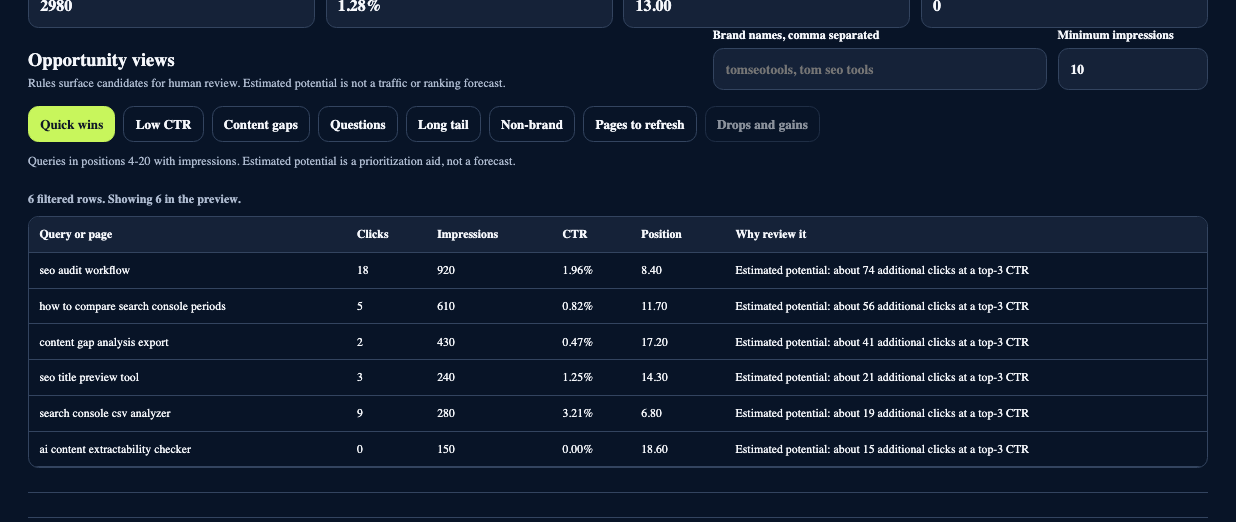
The Quick wins view surfaces queries with impressions in positions 4-20. This is a useful review range because the URL is already visible, but visibility alone does not make the next edit obvious.
The estimated click potential is a prioritization heuristic. It is not Google data, a traffic forecast or a promise that moving one position will produce a fixed number of clicks. Treat the number as a way to order a queue, then investigate each row.
Before changing anything, verify:
- Which URL ranks for the query?
- Does that page satisfy the same intent as the current search results?
- Is the result commercially or editorially useful to the site?
- Are ads, local packs, videos, AI features or other result types affecting normal organic clicks?
- Is the page already the best realistic match, even if it is not in the top three?
A query can sit at position 11 because the page is missing a useful section. It can also sit there because the result set prefers a different content type, the query is ambiguous or stronger sources deserve the higher positions. The export cannot decide which explanation is true.
Review Low CTR in Context
The Low CTR view is another shortlist, not a verdict. CTR changes with position, device, brand recognition, query type and the shape of the result page. There is no universal percentage that makes every snippet good or bad.
For a visible query with lower-than-expected CTR, inspect the live result and ask:
- Does the title describe the actual page rather than a broader promise?
- Is the key distinction visible before the title truncates?
- Does the description support the title without repeating it?
- Is the query navigational, branded or answered directly in the result page?
- Are you comparing similar devices, countries and date ranges?
Use the SERP Preview and Meta Generator to compare wording and estimated width. A preview helps you edit, but Google may rewrite titles and snippets, so it cannot reproduce a guaranteed result.
Separate Content Gaps From Weak Existing Pages
A query below position 20 may reveal missing coverage, but it does not prove that you need a new article. First inspect the URL that Google already associates with the query.
| What you find | Likely next action | What not to assume |
|---|---|---|
| Relevant page, shallow section | Expand the section with evidence and examples | More words automatically improve ranking |
| Relevant page, confused focus | Clarify the page purpose, title and structure | Every secondary query deserves its own page |
| Wrong page ranking | Review internal links, overlap and page intent | Two ranking URLs always mean cannibalization |
| No genuinely useful page | Consider a new page with a distinct job | A keyword gap is automatically a content opportunity |
| Query has no business or reader value | Reject the candidate | Every impression must be converted into content |
The SEO Content Analyzer can support the on-page review, while the Heading Structure Checker makes the document outline visible. Neither tool can decide whether the page deserves to exist.
Use Questions and Long-Tail Queries for Useful Additions
Question-shaped queries can expose missing explanations, examples or constraints. Group them by intent before writing. Five variations of “how long does it take?” usually need one complete answer, not five thin FAQ entries.
Answer questions only when the page can support the answer with real knowledge or evidence. Keep the subject explicit, place important conditions near the answer and avoid padding the section with generic introductions.
The AI Extractability Checker can review whether a section retains its subject and context when read on its own. It cannot predict rankings or AI citations.
Find Pages to Refresh and Compare Periods
A page in positions 8-30 with meaningful impressions can be a refresh candidate, particularly when its topic, examples or instructions have genuinely become stale. Age by itself is not a reason to rewrite a page that still solves the task.
For gains and losses, use a comparison export and diagnose the change before editing. Check:
- whether demand changed between the periods;
- whether seasonality or a news event affected the query;
- whether the ranking URL changed;
- whether the page was migrated, redirected or temporarily unavailable;
- whether indexing or canonical signals changed;
- whether the loss comes from one device, country or search appearance;
- whether impressions fell, CTR fell or both moved.
A decline in clicks with stable position can have a different cause from a decline in both impressions and position. Search Console provides evidence of what changed, not a complete causal explanation.
Turn the Export Into a Review Queue
The analyzer is most useful when its filtered rows become a small backlog with an owner and a verification step.
| Candidate | Evidence to check | Possible action | Owner | Review date |
|---|---|---|---|---|
| Low CTR query | Live result, title, intent, SERP features | Rewrite the snippet or leave it unchanged | SEO | Date |
| Quick-win query | Ranking URL, content type, business value | Improve a section, links or no action | SEO/editor | Date |
| Content-gap query | Existing URL and coverage | Expand, create, consolidate or reject | Editor | Date |
| Dropping query | Both periods, demand, page and index changes | Diagnose before editing | SEO | Date |
| Question query | Source support and repeated intent | Add one useful answer or reject | Subject owner | Date |
Export the filtered rows, choose only the candidates you can verify and record why each action was accepted. A backlog of ten defensible decisions is more valuable than a dashboard of 500 unreviewed “opportunities.”
A Compact Review Checklist
Before accepting an analyzer suggestion:
- confirm the export range, filters and search type;
- verify the ranking page and live result;
- distinguish observed metrics from estimated potential;
- check whether the candidate supports a real reader task;
- reject duplicate or low-value content ideas;
- record the evidence, owner and review date;
- measure the result after enough comparable data exists.
Open the GSC Export Analyzer when you have the XLSX or CSV ready. The tool can reduce the sorting work. The final decision still belongs to the person who understands the page, the audience and the consequences of changing it.
Sources and Method
- Google Search Console Help: Exporting data from Search Console
- Google Search Console Help: About Search Console data
- Google Search Console Help: Performance report aggregation
- Google Search Console Help: Filtering and comparing performance data
Source review date: 27 October 2026. Tool behavior was checked locally with a synthetic export. The screenshots and example values do not represent a live website. TomSEOTools does not guarantee rankings, traffic or a particular CTR outcome.