SEO structure - On-device
Free Heading Checker
for H1-H6 Structure.
Inspect H1-H6 structure from pasted HTML, a local HTML file, or a text outline without sending a URL or page content to a proxy.
No URL fetch
No proxy, API, upload, or storage
Inert parsing
Scripts in local HTML are never executed
Workspace
Heading Structure Checker
HTML and files are analyzed in this browser. Nothing is fetched, uploaded, stored, or sent to an API.
JavaScript in the file is never executed. Only inert heading text is read.
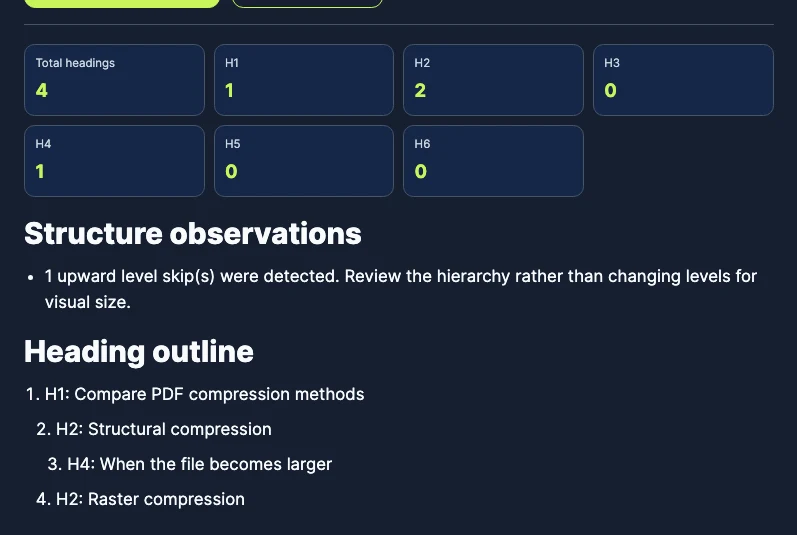
Structure observations
Heading outline
What it checks
Read the outline as a person would.
- H1-H6 counts and document order
- Upward level skips such as H2 to H4
- Missing, multiple, and empty H1-H6 elements
- Repeated heading labels
- Invalid lines in a pasted text outline
A level skip is a review prompt, not automatic proof that the page is inaccessible or poorly optimized.
Use it well
Use headings to describe sections, not to style text.
A useful outline helps readers and assistive technology understand the page. Choose levels from the content hierarchy, then handle visual size with CSS rather than selecting a heading level for appearance.
Worked example: fix a missing section level
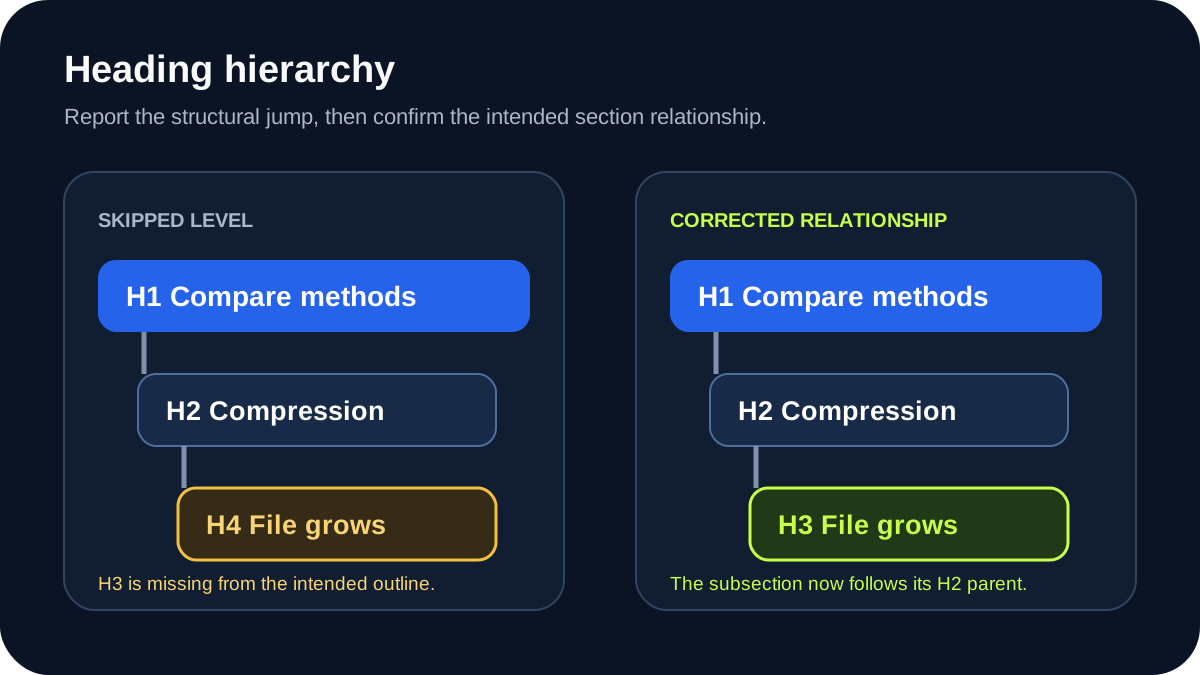
Suppose a product comparison page produces this outline. The H4 starts a subsection of an H2 even though no H3 introduces that subsection.
H1: Compare PDF compression methods
H2: Structural compression
H4: When the file becomes larger
H2: Raster compression
The checker reports the upward jump from H2 to H4. Change the H4 to H3 when it is genuinely a subsection of Structural compression. Moving from that H3 back to the next H2 is valid because the first subsection has ended.
H1: Compare PDF compression methods
H2: Structural compression
H3: When the file becomes larger
H2: Raster compression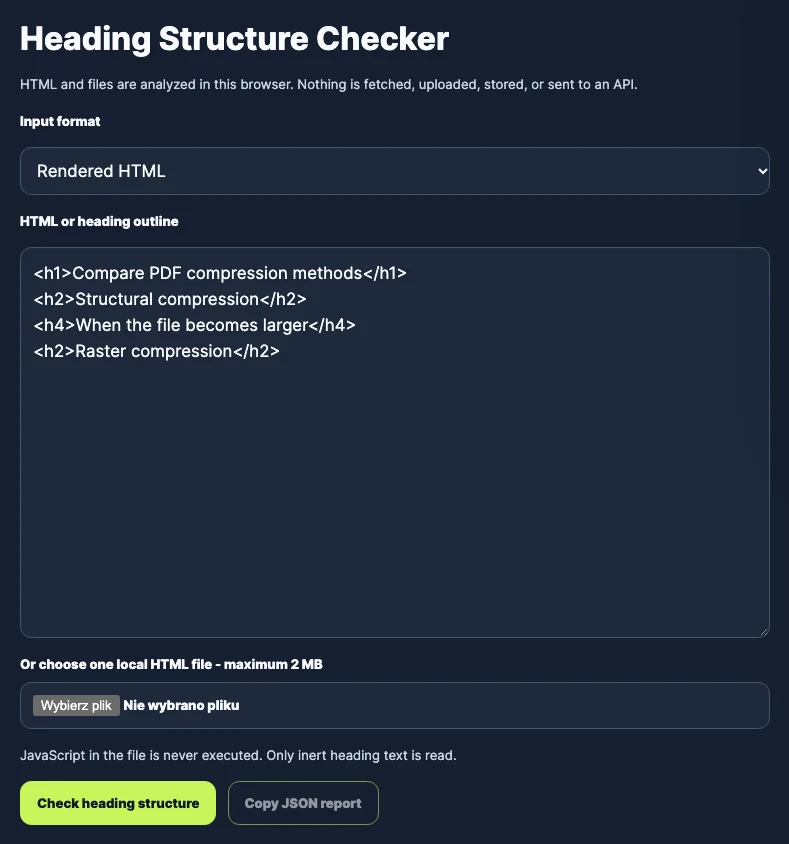
Choose the input that matches the page state
| Input | Best use | Main limitation |
|---|---|---|
| Pasted HTML | A rendered fragment copied from browser developer tools | Content outside the copied fragment is absent |
| Local HTML file | Private, staging, authenticated, or archived pages | Interaction-loaded content may be missing from the saved file |
| Text outline | Early editorial planning with one H1-H6 entry per line | It does not verify the final document markup |
How to interpret each observation
- Missing H1: confirm that the page has a clear primary heading in the rendered document.
- Multiple H1 elements: review whether one main topic is still obvious instead of applying an automatic penalty.
- Skipped level: check whether a parent section is missing or whether the jump reflects an intentional component structure.
- Repeated label: decide whether identical headings make navigation ambiguous for people scanning the outline.
- Empty heading: remove it or provide a label that describes the section it introduces.
Source HTML and the rendered page can differ
View Source shows the response sent by the server. WordPress blocks, page builders, and JavaScript can change the DOM after that response arrives. For the closest representation of what a browser currently exposes, inspect the rendered page in developer tools and copy the relevant HTML after scripts have finished.
A saved HTML file is useful for private, staging, or authenticated pages because it stays on the device. It can still omit content loaded only after interaction, inside another document, or in a closed shadow root. Recheck the final published page with browser accessibility tools when accessibility is the decision being made.
Method, limits, and privacy
The checker parses the supplied document without executing its scripts, extracts native H1-H6 elements in document order, and reports counts, empty labels, repeated labels, and upward level skips. It does not grade keywords, visual font size, writing quality, CSS, ARIA relationships, or the complete accessibility tree.
No URL is fetched and no supplied HTML is uploaded. A clean outline is useful evidence, but it does not prove accessibility, content quality, or higher rankings. Review headings together with the text they introduce and the real navigation experience.
Sources and last review
Method and guidance reviewed on 12 October 2026. The worked example was created for TomSEOTools and can be reproduced in the current checker.
01
Paste HTML or choose a file
02
Inspect the outline and observations
03
Fix the source page and verify again
Common questions
How do I check the heading structure of a web page?
Copy the rendered HTML or save the page as an HTML file, then analyze it locally. You can also paste an outline with one H1-H6 entry per line.
Why can I not enter a public URL?
A browser cannot reliably read arbitrary websites because of cross-origin protections. Sending the URL through a public proxy would disclose it and add a third-party security and availability dependency.
Should a page have exactly one H1?
One clear primary H1 is a practical default. Modern HTML can contain more than one, but multiple H1 elements should be intentional and should not make the main page topic ambiguous.
Is skipping from H2 to H4 always wrong?
No. It is a useful review signal because it can indicate a missing structural level. Check the meaning and nesting of the sections instead of changing numbers mechanically.
Can headings be used only to make text larger?
No. Heading elements communicate document structure. Use CSS for visual size and select H1-H6 levels according to the relationship between sections.
Does heading order directly improve rankings?
There is no guaranteed ranking formula based on heading counts. Clear headings can improve comprehension, navigation, accessibility, and how explicitly a page communicates its topics.
Can this tool assess the quality of the content under each heading?
No. It reads the outline only. For broader structural observations, metadata, links, and literal topic coverage, use the SEO Content Analyzer.
Can I see a complete heading hierarchy audit?
Yes. The HTML heading hierarchy audit follows a real before-and-after outline and explains which warnings need human interpretation.
Is the pasted HTML or local file uploaded?
No. Parsing and report generation happen in this browser. Scripts from the pasted or selected HTML are never executed.