A useful heading hierarchy gives a page a meaningful structure and helps people navigate its sections. A skipped level does not automatically cause a search penalty or make a page inaccessible, but it can make the intended relationships between sections harder to understand.
This guide shows how to inspect a real heading outline, correct an H2-to-H4 skip, compare source HTML with the rendered DOM, and perform a practical accessibility review before publishing.
How to Check H1-H6 Structure Without an API
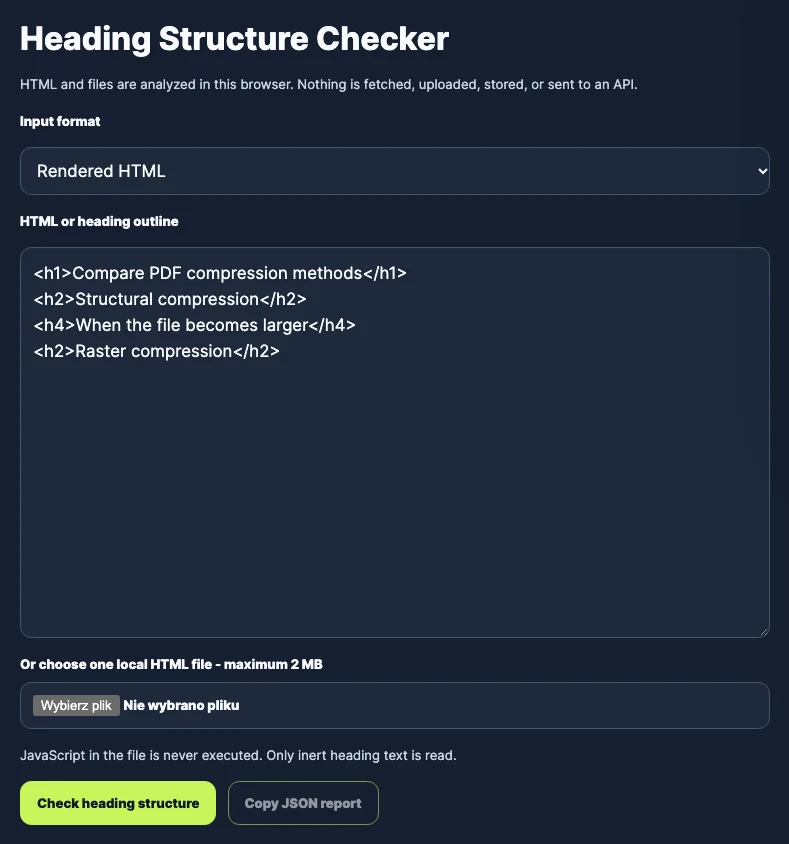
Start by extracting the page’s <h1> through <h6> elements in document order. Record each level and its visible text. You can do this without an external crawler by copying HTML from the browser or by using a local heading checker.
A practical editorial structure commonly uses:
- one descriptive
<h1>for the page’s primary topic; <h2>elements for its major sections;<h3>elements for subsections within an H2 section;- deeper levels only when the content genuinely contains another nested layer.
The numbers express relationships, not visual size. If an H3 looks too small, change its CSS rather than replacing it with an H2 that does not match the content structure.
Source HTML Versus Rendered DOM
Source HTML is the initial document returned by the server. The rendered DOM is the document after the browser has parsed it and any client-side scripts have modified it.
On a server-rendered article, both versions may contain the same headings. On a JavaScript application, navigation, accordions, widgets, or page sections may add headings after the initial response. A source-only check can therefore miss headings that are present in the rendered page.
The rendered DOM is still not the complete accessibility review. Browser and assistive-technology behavior also depends on semantics, visibility, labels, and the accessibility tree. Treat the DOM outline as one piece of evidence rather than a final accessibility verdict.
Worked Example: Fixing an H2-to-H4 Skip
Page builders and rich-text editors often encourage authors to choose a heading tag because of how it looks. Consider this product-page outline:
Before
<h1>Advanced SEO Tools<h2>Tool Features<h4>Character Counter<h4>SERP Preview<h2>Pricing<h5>Enterprise Plan
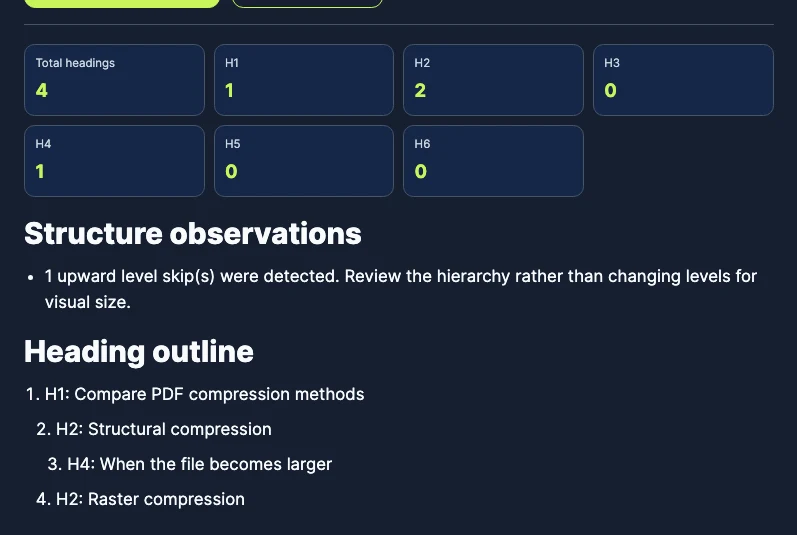
The two tool names are direct subsections of "Tool Features", so H4 implies a missing H3 layer. "Enterprise Plan" is a direct subsection of "Pricing", but H5 implies two missing levels.
After
<h1>Advanced SEO Tools<h2>Tool Features<h3>Character Counter<h3>SERP Preview<h2>Pricing<h3>Enterprise Plan
Changing the H4 and H5 elements to H3 makes the relationships explicit. It does not prove the copy is useful or that the page will rank. It simply makes the document outline match the page’s intended organization.
You can reproduce the check by pasting either version into the TomSEOTools Heading Structure Checker. The first outline should report upward-level skips; the corrected outline should not.
Keyboard and Accessibility Review
The W3C WAI headings tutorial explains that headings communicate how content is organized and that nesting should reflect the relationships between sections. Many screen readers also provide a heading list or commands for moving between headings.
Use this short review after fixing the HTML:
- Read only the heading text in order. Confirm that it forms a useful outline without requiring the surrounding paragraphs.
- Use the browser’s accessibility inspector, or a screen reader you are qualified to test, to review the exposed heading levels.
- Navigate through interactive elements with the keyboard. Heading structure does not replace correct focus order, visible focus, or meaningful control labels.
- Expand accordions and menus. Check whether dynamically revealed headings appear at a sensible level and whether hidden headings stay out of navigation.
- Review the page at narrow widths. Responsive layouts may reorder visible components even when the DOM order remains unchanged.
Do not claim that this checklist constitutes a complete WCAG audit. It tests a limited part of page structure and navigation.
Common Heading Mistakes
- Using headings for styling: Choosing an
<h3>only because it looks bold or large. Use CSS for presentation. - Repeating generic H1s: Giving several unrelated sections the same top-level importance. One descriptive page title is usually easier to understand and maintain.
- Empty headings: An empty heading or one containing only an unlabeled icon creates an unhelpful navigation stop.
- Heading-shaped text: Styling a paragraph to look like a heading without using heading semantics.
- Widget headings outside the page outline: Third-party components may insert headings that conflict with the surrounding article structure.
What a Heading Audit Cannot Prove
A structural audit can identify observable levels, order, duplicate labels, and empty headings. It cannot determine the overall quality of the page.
- Not verified: Skipped heading levels directly cause search-engine ranking penalties.
- Not verified: Including an exact-match keyword in every H2 improves rankings.
- A checker cannot decide whether a heading accurately summarizes the section below it.
- A clean outline does not prove that the page is accessible, factually correct, original, or helpful.
- Source or pasted-HTML analysis cannot reveal every change made by the live browser.
After reviewing structure, use the SEO Content Analyzer to inspect the text, links, and other observable page elements. Its findings are editorial observations, not a universal quality or ranking score.
Frequently Asked Questions
Is skipping from H2 to H4 always an SEO problem?
No direct ranking penalty should be inferred from the skip alone. It is a structural review signal: verify whether an intermediate section is missing or whether the H4 was chosen only for its visual style.
Why does copied source HTML differ from the rendered page?
Modern sites can add or change elements after the initial HTML response. The source represents the server response; the rendered DOM includes client-side changes made in the browser.
Does fixing heading hierarchy guarantee better rankings?
No. It clarifies the document structure, but rankings depend on many signals and cannot be predicted from heading order alone.
Should every page contain exactly one H1?
Using one descriptive H1 is a clear and maintainable convention for most editorial and tool pages. The heading level must still match the actual document structure; a checker should not turn that convention into a claim about guaranteed rankings.
Sources and Review Date
- Sources reviewed on 19 October 2026.
- W3C WAI: Headings – how headings communicate page organization and should reflect nested sections.
- W3C WAI: Writing for Web Accessibility – guidance on informative, unique page titles and meaningful headings.
- Google Search Central: Creating helpful, reliable, people-first content – questions for evaluating whether content serves its intended audience.
How this guide was prepared: Gemini produced the initial research draft using the TomSEOTools Content Editor Gem. The TomSEOTools maintainer then corrected unsupported and overly absolute claims, reviewed the cited primary sources, and retained responsibility for the final draft.