Writing utility - On-device
SEO Character Counter
for Text and SERP Copy.
Measure characters, words, letters, whitespace, paragraphs, sentences, and approximate pages, then shorten copy to a chosen limit.
Live counts
Updates as you type or paste
Local processing
No text is uploaded or stored
Workspace
Text Character Counter
Live counts stay on this device. One estimated page equals 1,800 characters.
160 characters remaining
Counting rules
Know what the numbers mean.
- Characters use Unicode code points
- Whitespace includes spaces, tabs, and line breaks
- Empty lines are not paragraphs
- A page estimate uses 1,800 characters
- Shortening preserves the source and prefers a word boundary
Use it well
Count constraints, then edit for usefulness.
Length can reveal a broken title, description, brief, or form field, but it does not measure clarity, evidence, originality, or search quality.
Worked example: shorten a description without cutting a word
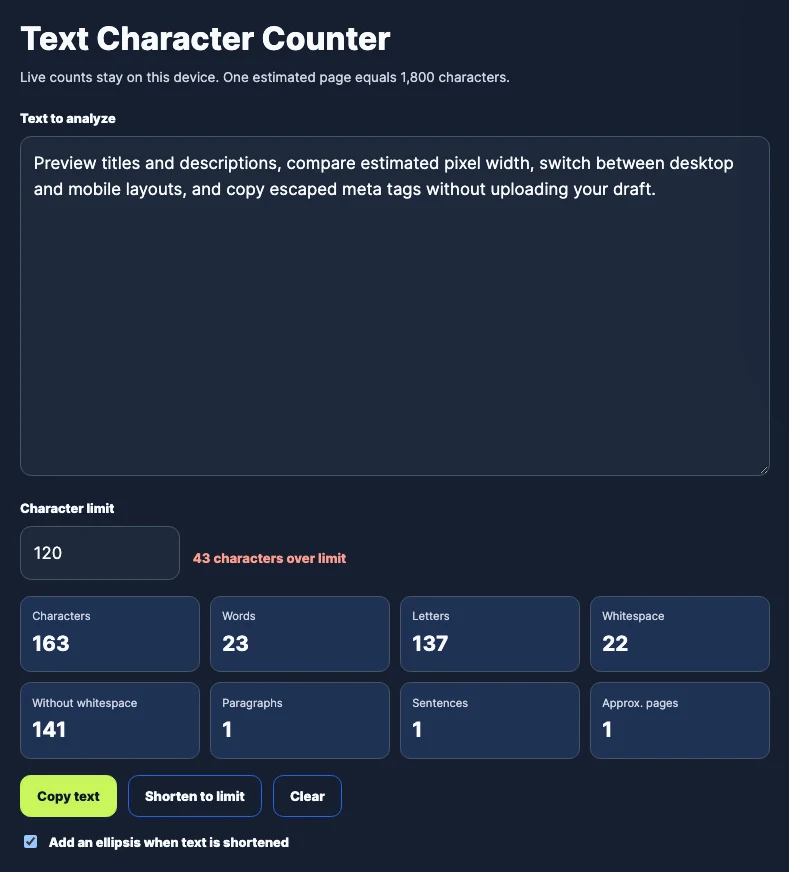
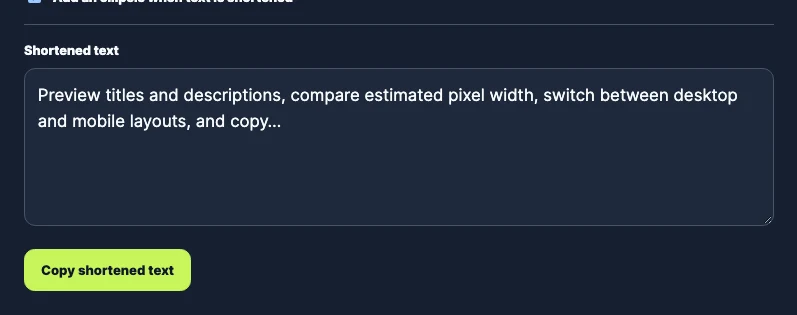
Paste the sample description below, set the limit to 155, keep the ellipsis option enabled, and choose Shorten to limit. The original remains unchanged while the separate result stops at a word boundary when possible.
Preview titles and descriptions, compare estimated pixel width, switch between desktop and mobile layouts, and copy escaped meta tags without uploading your draft.Read the result as an editing candidate, not a finished promise. Check that it still names the task, differentiator, and limitation that matter to the searcher. Then open the SERP Preview to compare estimated rendered width because equal character counts can occupy different amounts of space.
Code points are not always user-perceived characters
This tool counts Unicode code points with the browser equivalent of Array.from. That avoids splitting UTF-16 surrogate pairs, but one visible symbol can still contain several code points. A letter plus a combining accent and some emoji sequences can therefore display as one user-perceived character while the counter reports more than one.
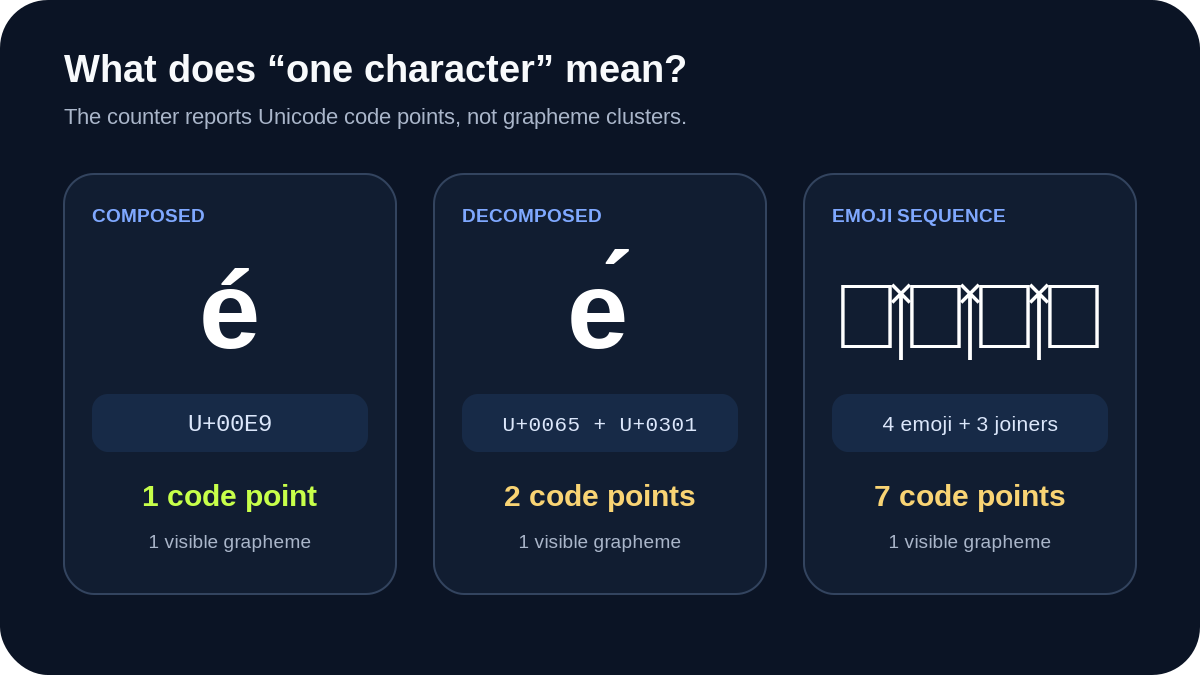
Unicode calls the sequences people commonly perceive as single characters grapheme clusters. A future grapheme metric should be labeled separately. Silently replacing the current code-point count would change existing results and could make form-limit comparisons less predictable.
| Example | UTF-16 units | Code points | Grapheme clusters |
|---|---|---|---|
| Latin A | 1 | 1 | 1 |
| Precomposed é | 1 | 1 | 1 |
| Decomposed e + combining accent | 2 | 2 | 1 |
| Family emoji | 11 | 7 | 1 |
How to interpret the remaining metrics
- Without whitespace removes spaces, tabs, and line breaks before counting code points.
- Words are groups separated by whitespace, so results are less useful for writing systems that do not use spaces in the same way.
- Sentences are estimated from full stops, question marks, and exclamation marks followed by whitespace or the end of the text.
- Paragraphs are non-empty groups separated by line breaks.
- Pages use a fixed estimate of 1,800 characters and do not model fonts, margins, images, or layout.
Limits and privacy
A count can confirm a technical limit, but it cannot determine whether a title, description, article, or prompt is accurate or useful. Abbreviations and punctuation can also make the sentence estimate differ from an editor or language-aware segmenter. Use the numbers to locate constraints, then review the actual text.
All counting and shortening run in the browser. The page does not upload, store, or send the text to an AI service. Clearing the field removes the working value from the interface.
Sources and last review
Method and guidance reviewed on 12 October 2026. Counting behavior is documented from the current TomSEOTools implementation.
01
Paste or type text
02
Set an optional limit
03
Shorten, copy, or clear
Common questions
How do I count characters in text?
Paste or type the text in the workspace. Character, word, letter, whitespace, paragraph, sentence, and approximate page counts update immediately.
Does the character count include spaces?
Yes. The Characters metric includes whitespace. Use Without whitespace when a field or workflow needs a count with spaces, tabs, and line breaks removed.
How do I shorten text to a character limit?
Enter the limit and choose Shorten to limit. The source remains unchanged, while a separate result is cut at a word boundary when possible and can include an ellipsis.
Will shortening split an emoji or Unicode character?
The tool works with Unicode code points rather than UTF-16 code units, so it does not split surrogate pairs. A combined emoji or letter with separate combining marks can still contain more than one counted code point.
Is my text sent to TomSEOTools?
No. Counting and shortening happen locally in the browser, and the text is not uploaded or stored.
Is the page count exact?
No. It is a simple estimate based on 1,800 characters per page. Layout and typography change real pagination.
Does the counter measure content quality or SEO?
No. Length is a constraint, not a quality score. Accuracy, clarity, evidence, intent match, originality, and usefulness require editorial review.
Can I check a title and meta description here?
You can count their characters here. For estimated rendered width and desktop or mobile layouts, use the SERP Preview and Meta Generator.
Can this counter estimate LLM tokens or context-window use?
Character and word counts are not model tokens. For a transparent local estimate, context boundaries, and RAG chunk planning, use the LLM Token Counter.
Why can one visible character produce a larger count?
Read the worked comparison of characters, code points, grapheme clusters, and pixel width for reproducible Unicode examples and the limits of each metric.