A weak SEO title is not fixed by adding a keyword or forcing the text below an arbitrary character limit. A useful rewrite starts with the page itself: what it does, who it helps, and why someone should choose this result over another one.
This workshop shows a repeatable editing process. You will diagnose one intentionally generic title, create alternatives, compare them with transparent criteria, and verify the implementation. It does not promise a ranking or click-through-rate increase. It gives you a decision you can explain and test.
Why This Article Has a Narrower Job
The original version of this article competed with the SERP Preview and Meta Generator and its supporting guide by covering the same general rules. This revision has a different purpose: it is a hands-on title-rewriting exercise.
The recorded Search Console baseline for the existing URL was 0 clicks, 125 impressions, 0% CTR, and an average position of 63.07 for the period ending October 18, 2026. That is not enough evidence to blame the title. At that average position, limited visibility is an obvious confounding factor. The data justifies reviewing the page; it does not prove that a new title will improve performance.
Start With the Page, Not the Pixel Meter
Before writing candidates, record five facts:
| Question | What to record |
|---|---|
| What is the page? | Tool, guide, product page, category, or another page type |
| Who is it for? | The specific reader or user completing the task |
| What is the primary task? | The one outcome the page delivers |
| What makes it distinct? | A capability, method, constraint, or audience that is genuinely present |
| What does the visible page promise? | H1, opening paragraph, primary interface, and supporting content |
Do not put a feature in the title just because it sounds valuable. The rendered page must support it. A title that claims more than the page delivers creates a mismatch for readers and gives search systems inconsistent signals.
The Repeatable Rewrite Workflow
1. Diagnose the Current Candidate
Write down why the title is weak using observable language. Useful diagnoses include:
- too generic to distinguish the page;
- unclear about the task;
- repeated boilerplate consumes the useful space;
- wording does not match the H1 or primary content;
- important context appears only at the end;
- several phrases compete for the same title;
- the title claims a feature the page does not provide.
Avoid diagnoses such as "Google does not like it" unless you have specific evidence. A title link can differ from the HTML title for several documented reasons, and a single search result is not a controlled experiment.
2. Define One Sentence of Value
Complete this sentence:
This page helps [audience] do [primary task] with [real differentiator, if useful].
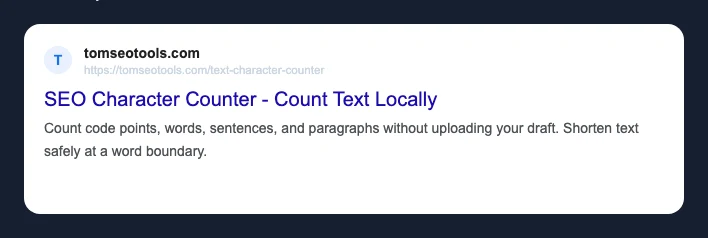
For the TomSEOTools Character Counter, a working version is:
This page helps writers and SEO practitioners count text locally and review its length for common publishing tasks.
That sentence is an editorial brief, not the final title. Its job is to stop unrelated keywords from entering the draft.
3. Draft Candidates With Different Emphases
Create three to five candidates. Change the emphasis rather than swapping synonyms:
- task first;
- audience or use case first;
- differentiator first;
- concise descriptive version;
- brand included only when it adds recognition or necessary context.
Keep each candidate accurate when read without the description or URL.
4. Compare Meaning Before Width
Score each candidate against the page, not against a universal SEO formula:
| Criterion | Review question |
|---|---|
| Accuracy | Does the rendered page fulfil this wording? |
| Specificity | Could this title describe hundreds of unrelated pages? |
| Intent | Does it make the primary task clear? |
| Distinctiveness | Does it surface a real reason to choose this page? |
| Consistency | Does it agree with the H1 and opening content? |
| Brevity | Can any word be removed without losing useful meaning? |
Only after that review should you use width as an editing constraint.
5. Review the Local Preview
Paste the candidates into the SERP Preview and Meta Generator. Its pixel figure is a local estimate produced by the tool’s model. It is useful for comparing candidates consistently, but it is not a measurement of a live Google result and it is not a guaranteed cutoff.
Use the Text Character Counter when you need the Unicode code-point count. A code-point count and a rendered-width estimate answer different questions.
Before-and-After Demonstration: Character Counter
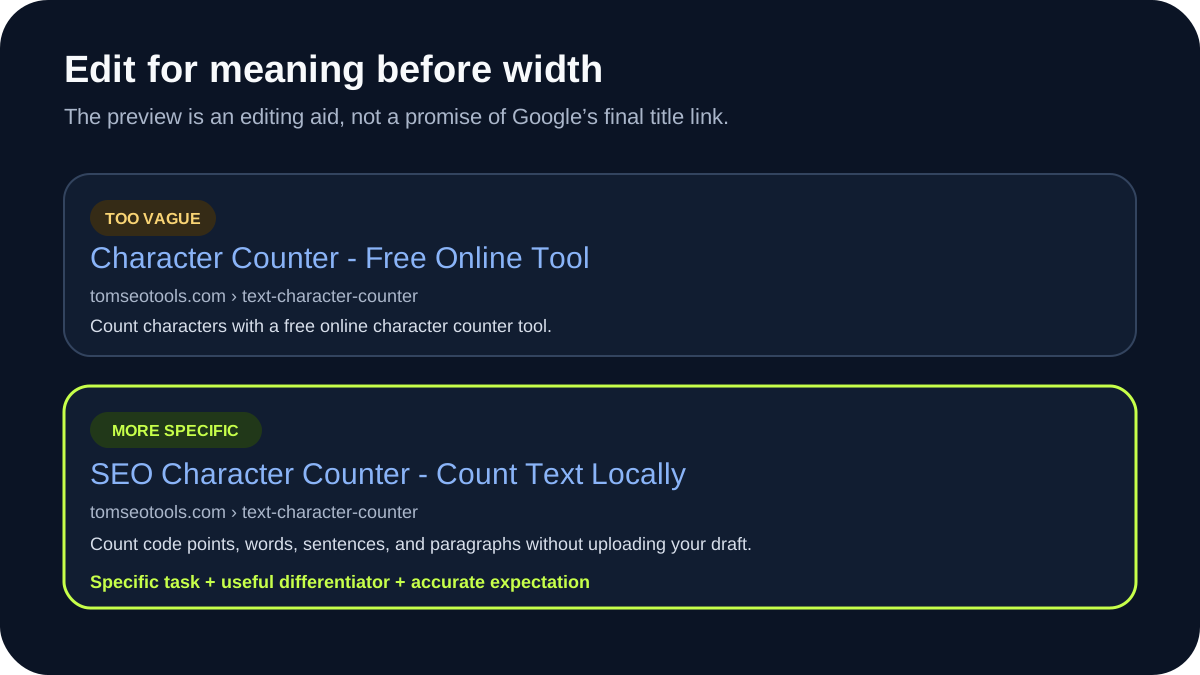
The following baseline is intentionally generic for this exercise:
Free Character Counter Tool
It is not presented as the previous or current production title. It describes the basic category, but says little about the use case or the page’s useful scope.
We can compare it with three alternatives:
| Candidate | Code points | TomSEOTools width estimate | Editorial assessment |
|---|---|---|---|
Free Character Counter Tool | 27 | 230 px | Clear category, but generic and dependent on "free" as the distinction |
SEO Character Counter - Count Text & SERP Length | 48 | 426 px | Strong task and SEO context; matches the current registry title |
Unicode Character Counter - Count Text Locally | 46 | 384 px | Highlights local processing and Unicode context, but narrows the audience |
Character Counter: Check Code Points and Text Length | 52 | 447 px | Precise terminology, but less immediately familiar to a general user |
The figures above come from the current TomSEOTools local estimation model and can be reproduced in the preview tool. They are not Google measurements.
For the existing Character Counter page, SEO Character Counter - Count Text & SERP Length is the strongest candidate in this comparison. It describes the task, introduces the relevant SEO use case, and stays readable. It is also the title currently configured in the TomSEOTools tool registry as reviewed on October 19, 2026.
That selection is an editorial decision, not proof that it will receive more clicks. Another candidate may be better if the page’s audience or functionality changes.
Keep the Title, H1, and Page Purpose Aligned
The HTML <title> and visible H1 do not need to be identical. They should, however, describe the same page.
A practical pattern is:
- use the HTML title to identify the page concisely in search results and browser tabs;
- use the H1 to introduce the task naturally on the page;
- use the opening paragraph to confirm the scope and important limitations;
- use navigation and internal anchor text that describe the destination honestly.
Google’s documentation says title links can be generated from several sources, including the <title> element, the main visible title, heading elements, og:title, prominent page text, and link text. Consistency reduces ambiguity, but it cannot force a particular title link.
Implement the Rewrite Carefully
After selecting a candidate:
- Update the title in the correct CMS or SEO field.
- Check whether the theme or SEO plugin appends a site name or other suffix.
- Keep one valid
<title>element in the rendered document head. - Confirm the canonical URL still points to the intended page.
- Review the visible H1 and opening paragraph for the same page purpose.
- Check
og:titleand other sharing metadata for accidental contradictions. - Clear relevant caches only when required by the publishing workflow.
- Open the public URL while logged out and inspect the rendered HTML.
- Test the page on a narrow viewport and with keyboard navigation if other page elements changed.
- Record the change date and the exact old and new values.
Do not change the URL merely to match the new wording. Existing URLs need a separate redirect and risk review.
Measure the Change Without Inventing a Win
Record a baseline before the edit and compare like-for-like periods later. At minimum, keep:
- URL;
- change date;
- old and new title;
- query and page filters used;
- clicks, impressions, CTR, and average position;
- comparison period and any seasonality or campaign notes;
- other page changes released at the same time.
A changed CTR does not prove the title caused it. Position, query mix, search-result features, demand, competitors, and Google’s chosen title link can all change. Treat the result as observational evidence unless the test design supports a stronger conclusion.
Common Mistakes
Treating a Character Count as a Rule
Fonts are proportional, scripts differ, and search layouts change. Character count is a transparent text metric; it is not a promise that a title will display unchanged.
Writing for the Meter Instead of the Reader
A candidate can fit the local model and still be vague, repetitive, or misleading. Meaning comes first.
Repeating Keywords
Repetition consumes space and often makes a result harder to read. Use the phrasing that best describes the page once.
Adding the Brand Automatically
A brand can provide useful context, but it is not mandatory in every title. Test whether it adds recognition or merely displaces the task.
Claiming the Rewrite Improved Rankings
A before-and-after timeline is not enough to isolate causation. Report observed changes with their dates and limitations instead of presenting a title rewrite as a guaranteed SEO tactic.
What This Workflow Cannot Predict
This process cannot guarantee:
- the exact title link displayed for a query;
- whether or where Google truncates the result;
- a ranking change;
- a CTR increase;
- consistent rendering across devices, countries, queries, or dates.
Google generates title links automatically and may use page elements other than the supplied HTML title. The Google title-link documentation is the primary reference for the signals and common title problems Google documents.
Frequently Asked Questions
Should the title and H1 be identical?
No. They can serve slightly different contexts, but they should describe the same page and avoid contradictory promises.
Is there a safe number of characters?
No universal character count guarantees a complete title link. Use a count for transparent editing and a width estimate for comparison, then write for clarity.
Why did Google show different wording?
Google generates title links from multiple sources and can select wording that it considers more relevant to the page or query. Review the <title>, H1, other prominent text, og:title, and internal or external anchor text for inconsistencies.
Should I change a title with impressions but no clicks?
Review it, but do not assume it is the cause. Check position, queries, intent, result features, indexing, and page quality. Low visibility can make CTR data too sparse for a reliable conclusion.
How soon should I judge the change?
There is no universal waiting period. Record the implementation date, wait for enough comparable impressions, and account for changes in average position and query mix. Mark the conclusion as inconclusive when the sample is too small.
Sources
- Google Search Central: Influencing your title links in search results
- Google Search Central: SEO Starter Guide
- WHATWG HTML: The title element
Editorial Disclosure
The first draft and research structure were produced with the TomSEOTools Content Editor Gem in Gemini. The TomSEOTools maintainer then checked the claims against the cited primary sources and the local tool implementation, recalculated every candidate with the current TomSEOTools estimator, removed unsupported performance claims, and edited the final draft. No ranking or CTR result has been invented, and this revision has not been published.